OpenAI recently launched Prism, a free LaTeX-native workspace for scientific writing. Real-time collaboration, GPT-5.2 integration, unlimited projects. It's a well-built tool.
But there's a question worth asking before you sign up: does it do your research, or does it help you write about research you've already done?
That's the actual difference between Prism and K-Dense Web, and it matters more than any feature comparison.
Prism is a writing tool
What Prism does:
- LaTeX editing in the cloud
- Collaboration with comments and real-time editing
- AI proofreading and citation management
- Literature search assistance
These are useful at the end of the research process. The bottleneck in research isn't formatting LaTeX. It's gathering and cleaning data, running statistical analyses, building and evaluating models, iterating on methodology, generating visualizations.
Prism doesn't touch any of that. It picks up after you've done the hard work and helps you write it up.
K-Dense Web takes a different approach: it does the research itself. It automatically pulls academic sources from dozens of databases, applies field-specific guidelines for your target venue, performs citation verification, and generates schematics and diagrams from your data.
What this looks like in practice
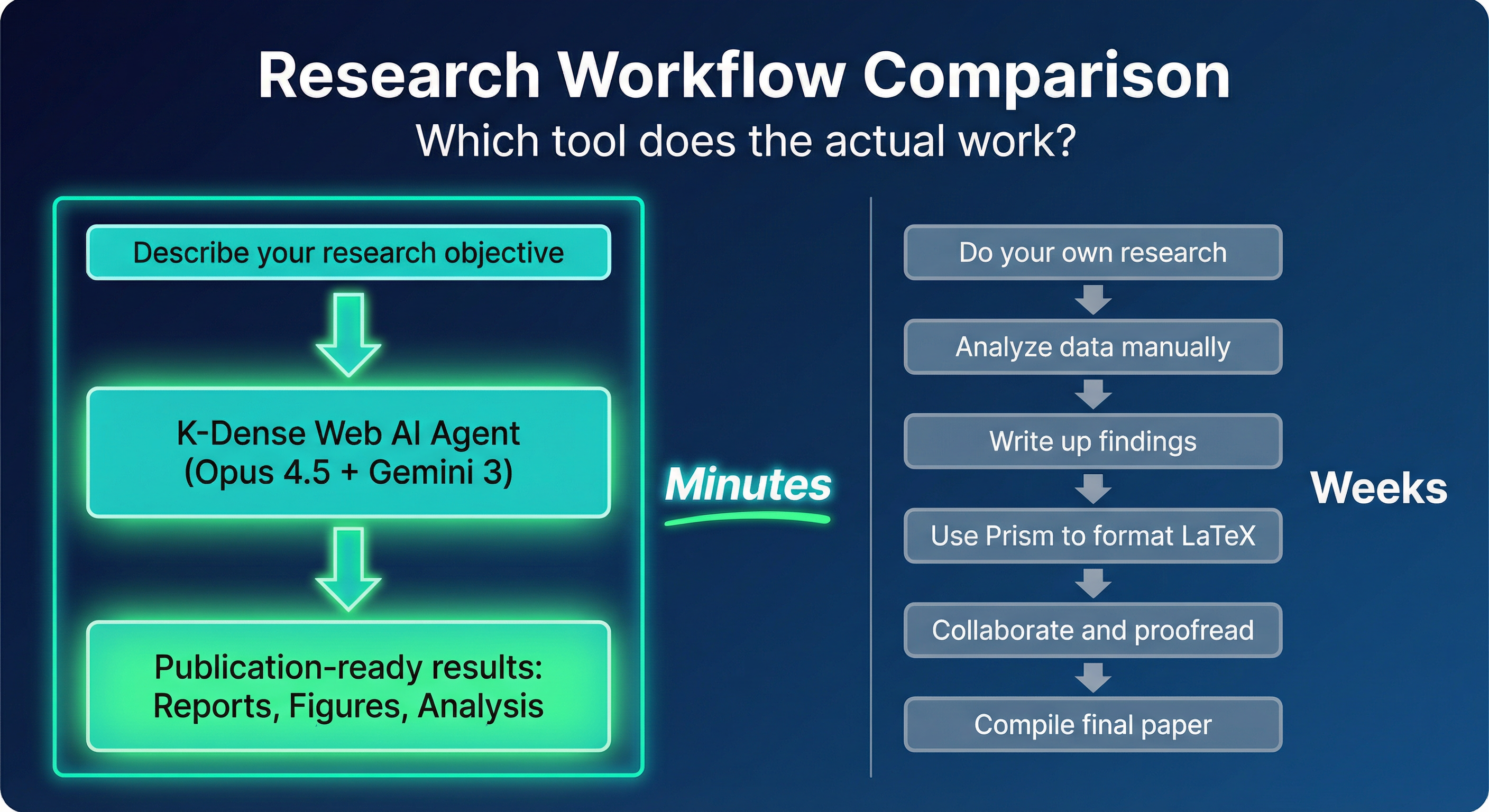
With K-Dense Web, you describe what you want to investigate and the agent handles data analysis, statistical modeling, visualization, and report generation. With Prism, you do all of that manually - Prism helps with the writing at the end.
The gap in time is significant:
- Hours of AI execution vs weeks of manual work
- Research that scales vs research that bottlenecks on you
- Reproducible pipelines vs one-off manual processes
Head-to-head comparison
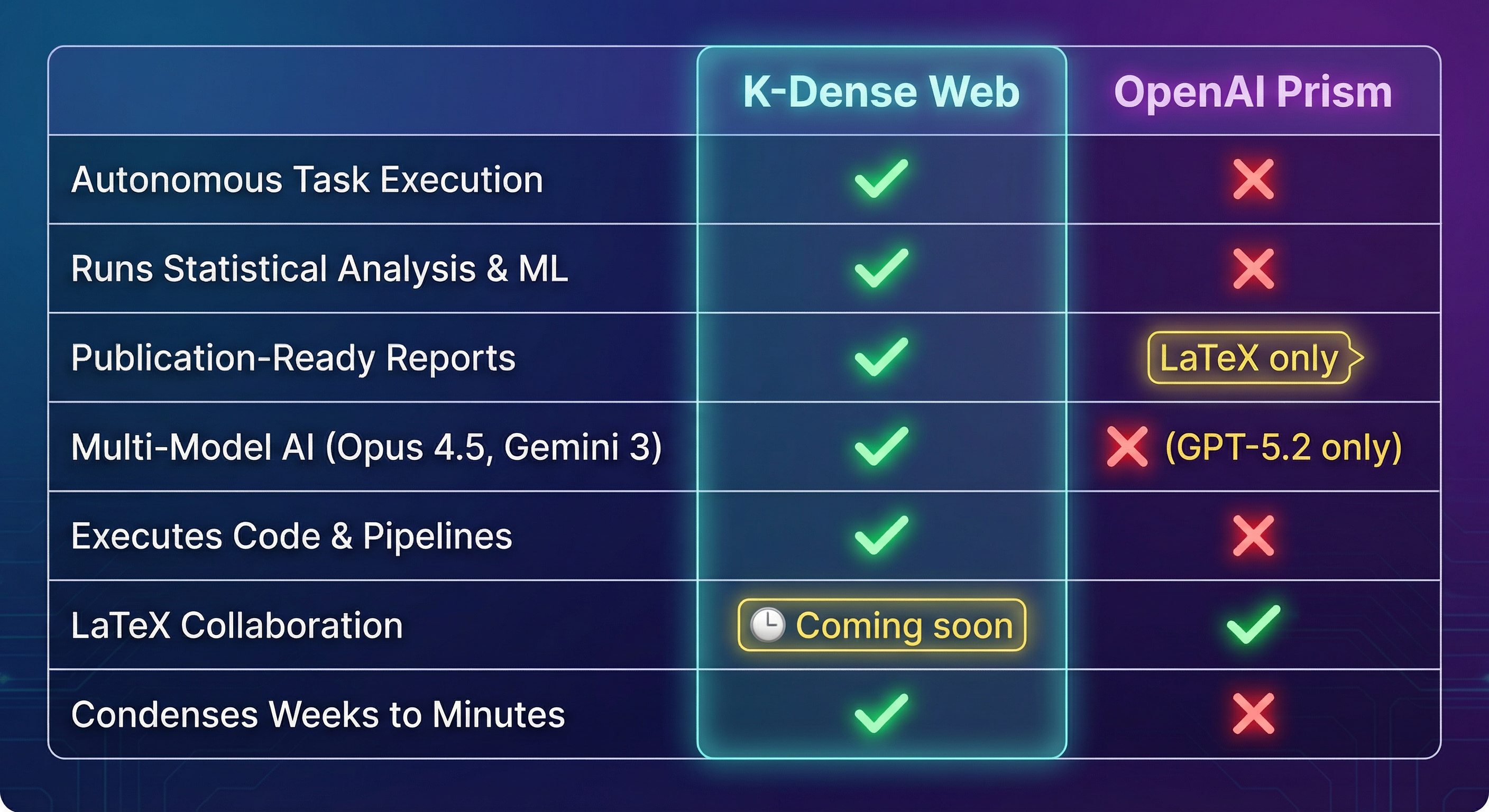
| Capability | K-Dense Web | OpenAI Prism |
|---|---|---|
| Primary function | Autonomous task execution | LaTeX editing & writing assistance |
| Does the research | Yes | No |
| Statistical analysis | Full code execution | None |
| Machine learning | Complete ML pipelines | None |
| Data processing | Automated ETL & cleaning | None |
| Academic source integration | Auto-pulls from dozens of databases | Manual literature search only |
| Field-specific guidelines | Venue-aware formatting & standards | Generic formatting |
| Citation verification | Extensive verification & review | Basic citation management |
| Schematic generation | Creates diagrams from research data | None |
| AI architecture | Multi-model (Opus 4.5, Gemini 3 Pro) | Single model (GPT-5.2) |
| Output formats | Reports, slides, figures, papers | LaTeX documents only |
| Code execution | Full code environment | None |
| Time to results | Minutes | Still requires weeks of your work |
| Who does the work | AI agent | You |
| LaTeX collaboration | Coming soon | Unlimited collaborators |
| Low-cost tier | Yes (Fast at $0-$5) | Yes (unlimited) |
A real example: drug discovery paper
Say you're working on antimicrobial resistance and want to publish on natural product drug candidates.
With Prism, you gather compound databases and literature manually, run QSAR modeling and molecular docking yourself, analyze structure-activity relationships, create visualizations of binding affinities, write up the methodology and results - then Prism helps format the LaTeX and proofread. Your co-authors collaborate on the writeup.
Time: weeks to months of your work, plus Prism for the final writing phase.
With K-Dense Web, you write something like:
Analyze antimicrobial natural products from the COCONUT database.
Identify candidates with activity against ESKAPE pathogens.
Perform molecular docking against key resistance mechanisms.
Generate a publication-ready report with SAR analysis and figures.
The agent runs the full pipeline. You review the output.
Time: minutes to hours of execution, plus your review.
This isn't hypothetical. The antimicrobial drug discovery case study shows K-Dense Web working through exactly this kind of project.
The model architecture
Prism uses GPT-5.2, which is capable for text generation and understanding. K-Dense Web runs multiple models:
- Claude Opus 4.5 for complex scientific reasoning
- Gemini 3 Pro for multimodal data processing
- Specialized domain models for targeted tasks
Different models are better at different things. Opus 4.5 handles statistical methodology selection; Gemini 3 Pro processes tables, figures, and complex datasets. Routing tasks to the right model matters for research work in ways it doesn't for text polishing.
Four things Prism doesn't do
Automatic academic source integration
K-Dense Web pulls from dozens of databases automatically: PubMed, arXiv, Semantic Scholar, CrossRef, and domain-specific repositories. Prism offers literature search assistance, but you still find, read, and synthesize sources yourself.
Field-specific formatting
A Nature paper has different requirements than an IEEE conference submission. K-Dense Web applies field-specific guidelines and venue requirements - CONSORT for medical journals, reproducibility checklists for ML venues, specific figure standards for chemistry journals. Prism provides generic LaTeX formatting without this.
Citation verification
K-Dense Web checks that references actually support the claims being made, verifies DOIs and metadata, and reviews the overall coherence of source material. Prism manages your bibliography, but verifying that citations are accurate and relevant is still your problem.
Schematic generation
Pathway diagrams, experimental flowcharts, system architecture schematics - K-Dense Web generates these from your research results and uploaded materials. Prism has nothing equivalent.
What about the free tier?
Prism is free with unlimited projects and collaborators, which is a real advantage for LaTeX editing.
K-Dense Web has a low-cost "Fast" effort level ($0-$5 per request). The ROI is simple: if K-Dense saves you a few days of research work, the higher tiers pay for themselves. But you don't need to take that on faith - Fast mode is a reasonable place to start.
When Prism makes sense
Prism fits well if you've already finished your analysis and need a collaborative LaTeX environment, your team is comfortable with LaTeX workflows, and you want free unlimited document editing. If you're a heavy LaTeX user who does all your analysis elsewhere, Prism is a solid upgrade from Overleaf with better AI integration.
Using both together
K-Dense Web and Prism don't actually overlap much. K-Dense handles the research phase; Prism handles collaborative writing. They're designed for different stages of the same process.
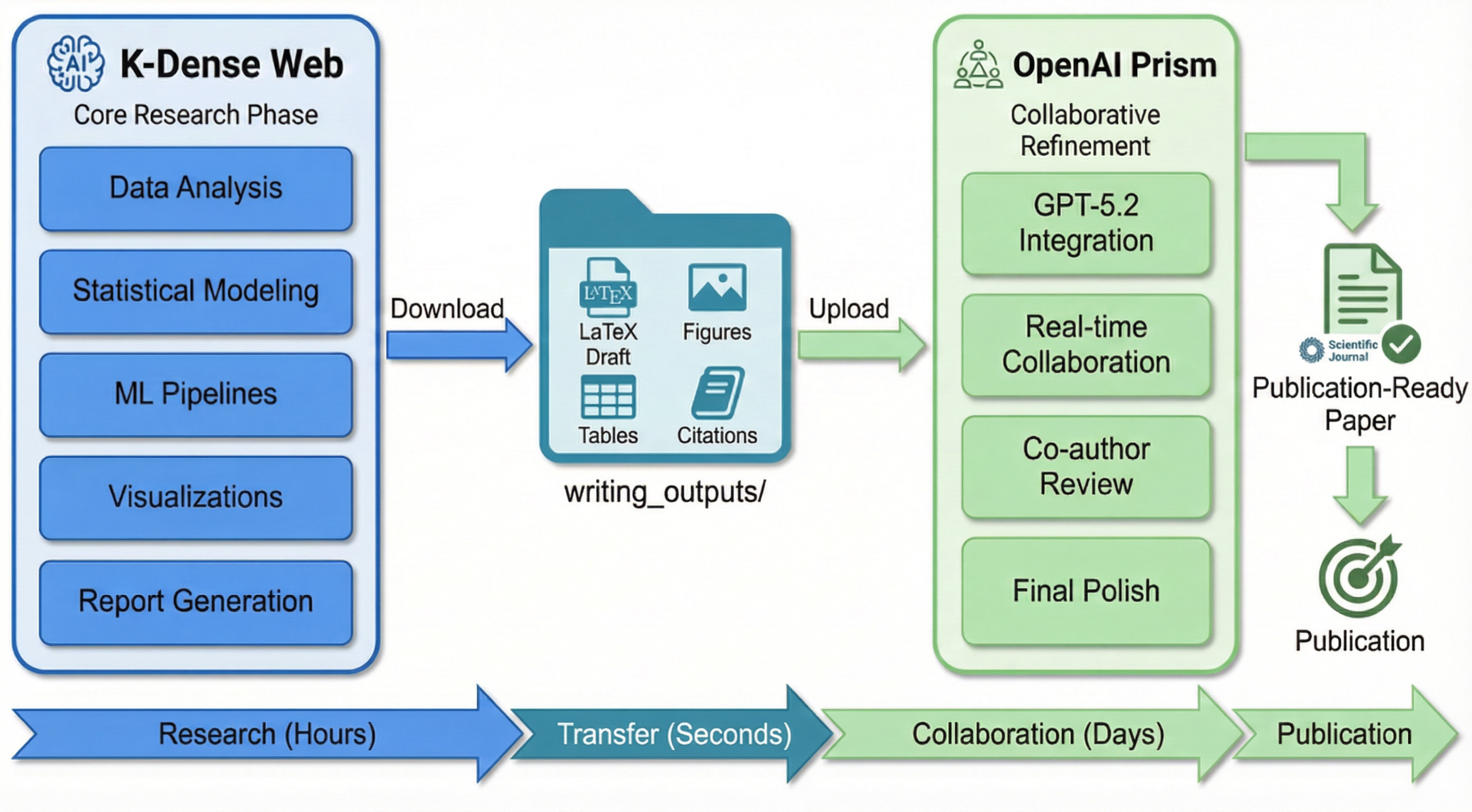
The workflow:
- Use K-Dense Web to analyze your data, run statistical models, and generate a publication-ready draft. Everything lands in a structured
writing_outputs/folder: LaTeX source, figures, tables with statistical results, formatted citations. - Download the
writing_outputs/folder. - Upload to Prism and bring in your co-authors for final polish and proofreading.
You get autonomous research execution and real-time collaborative editing, without having to choose between them.
When K-Dense Web is the right choice
K-Dense fits best when you need to actually conduct research, not just document it - statistical analysis, ML, data processing, automatic literature gathering, field-specific formatting, verified citations, auto-generated schematics. If you're working in science, finance, healthcare, or engineering and spending weeks on manual analysis that could be automated, that's the gap K-Dense is designed to fill.
The bottom line
Prism helps you write faster. K-Dense Web helps you research faster. They do different things at different stages, and the most effective workflow uses both: K-Dense to do the research and generate the initial draft, then Prism to collaborate with co-authors and refine it for submission.
Ready to see the difference? Get started on K-Dense Web →
Already have K-Dense outputs? Upload them to Prism → and collaborate with your team.
Questions? Reach out at contact@k-dense.ai.